We tagged one frame two ways and loaded each in Chrome. With a DVD's own 32:27 pixel aspect ratio flag attached to a 720x480 frame, the browser reported it natively as 853x480 and played full 16:9, no CSS involved. Strip that single flag and the identical pixel data reports as 720x480 and plays back at 3:2, visibly narrower than it should be.
Is your video actually stretched, or just a different shape than you expected?
Check the file before you touch anything else.
- Play it in a browser tab first. Convert VOB to MP4 or convert AVI to MP4 and open the result directly; round objects or faces that look narrower than they should point at the aspect ratio flag, not the picture data.
- Old DVD rips and Xvid or DivX AVIs are the usual source. Both stored widescreen video squeezed into a narrower frame and leaned on a flag to stretch it back at playback.
- Screen recordings, phone footage and anything already H.264 in an MP4 almost never have this problem, because the pixels were square from the start.
Non-square pixels at a glance
| Source | Storage size | Pixel aspect ratio | Display shape |
|---|---|---|---|
| Phone or screen capture, MP4 | Matches display | 1:1 (square) | Same as storage |
| NTSC DVD, standard 4:3 | 720x480 | 8:9 | 4:3 |
| NTSC DVD, anamorphic widescreen | 720x480 | 32:27 | 16:9 |
| PAL DVD or Xvid rip, anamorphic widescreen | 720x576 | 64:45 | 16:9 |
Does the flag actually survive converting, and does a browser honor it?
Yes to both, when the flag is there to begin with. We built a synthetic DVD-style clip, 720x480 MPEG-2 tagged 32:27 for a 16:9 picture, the exact anamorphic widescreen spec real DVDs use, and ran it through the same command FileFlip's engine issues for a default VOB to MP4 conversion: no Resolution, Bitrate or Frame rate override, just ffmpeg -i input.vob output.mp4.
| Source VOB | After converting to MP4 | |
|---|---|---|
| Storage size | 720x480 | 720x480 |
| Sample aspect ratio | 32:27 | 32:27 |
| Display aspect ratio | 16:9 | 16:9 |
We ran the same check on a 720x576 anamorphic AVI, the PAL equivalent, and got the same result: the flag came through untouched. Turning on FileFlip's Resolution control doesn't break it either. It scales height and width by the same factor, so a 720x480 frame at 32:27 resized to a 240-pixel height comes out 360x240, still 32:27, still 16:9.
Whether a player actually uses that flag is a separate question, and this is where it gets interesting. We loaded our converted MP4 in Chrome with no CSS at all and read back what the <video> element reported.
| Flag present, 32:27 | Flag stripped to 1:1 | |
|---|---|---|
ffprobe display aspect ratio |
16:9 | 3:2 |
Chrome's reported videoWidth x videoHeight |
853 x 480 | 720 x 480 |
| Rendered box, no CSS | 853 x 480, correct 16:9 | 720 x 480, visibly narrower |
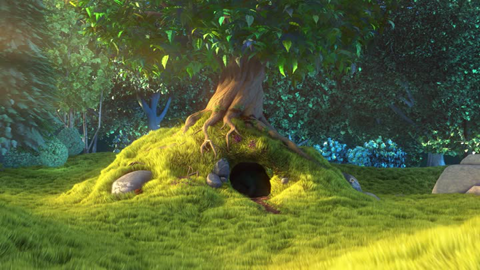 32:27 flag applied853x480 scaled down
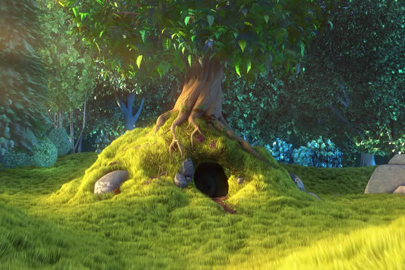 Flag ignored720x480 scaled down
A frame 5 seconds into our synthetic anamorphic clip. Left is a compliant player reading the 32:27 flag and stretching the frame. Right is the identical decoded pixels shown at the file's raw storage shape, which is what a player or converter gets when the flag is missing. The tree and the hollow under it are the same width in both; only the display shape changed.
That gap, 853 wide against 720 wide for the same decoded pixels, is the entire bug in one number. Chrome does the stretch automatically when the flag says to. Nothing does it when the flag is gone.
What's the difference between the display aspect ratio and the storage size?
The storage size is the actual grid of pixels the file holds. The display aspect ratio is the shape a player is told to show those pixels at. They're the same number only when every pixel is square. A 720x480 frame at 32:27 stores a 3:2-shaped grid and displays as 16:9, because each stored pixel is wider than it is tall by that exact factor.
What is anamorphic footage?
Anamorphic footage is video where the picture was deliberately squeezed narrower during encoding so it fits a storage frame smaller than its true display width, with the pixel aspect ratio flag carrying the instruction to stretch it back. A 16:9 scene encoded into a 720x480 NTSC DVD frame is squeezed to about 84% of its natural width to fit, and the 32:27 flag is what tells a player to stretch it back out to fill a widescreen screen. It's a real technique, not a mistake: standard-definition video only had 720 or 704 horizontal samples to work with regardless of what shape the picture actually was, so non-square pixels were how a fixed-size frame carried a variable display shape.
What's the difference between letterboxing and a squeezed picture?
Letterboxing bakes black bars into the actual pixels; a pixel aspect ratio mismatch never touches a pixel. A letterboxed 4:3 DVD stores a widescreen picture with real black rows painted into the top and bottom of an ordinary 720x480 frame, at square pixels, so every player shows it identically and correctly, just with less picture inside a 4:3 shape. Anamorphic encoding is the opposite trade: it keeps every pixel active picture and leans on the flag instead, which is smaller on disk but only correct when something reads that flag. A file can combine both, bars baked in on top of a non-square pixel grid, which is when people assume the whole thing is broken rather than two separate mechanisms stacked.
How do you check for this before you publish?
Read the flag directly instead of trusting how the file looks in whatever preview you already have open. ffprobe -show_streams yourfile.mp4 | grep aspect prints the pixel and display aspect ratio directly, and MediaInfo shows the same numbers in a plain window if the command line isn't where you want to be. A sample aspect ratio of 1:1 means square pixels and nothing to worry about; anything else means the flag exists and needs to survive wherever the file goes next.
Confirming the flag exists in the file isn't the same as confirming wherever you're publishing it reads that flag, exactly the gap our own browser test found above between a tagged file and an untagged one holding identical pixels. Play the converted file in the actual browser tab or app you're publishing to before calling it done, the same check that opened this article.
Where the FileFlip conversion still can't help
FileFlip has no Aspect ratio control in Advanced options, only Resolution, Bitrate and Frame rate. The flag we tested above rides along untouched, unless the source file already has it wrong. If a VOB or AVI arrives with a pixel aspect ratio that's already mislabeled by whatever ripped or encoded it, the conversion carries that wrong number forward faithfully, because nothing in the file tells FileFlip, or anything else, that the number is wrong. A squashed picture after converting a file that was already squashed before you touched it isn't something a container change was ever going to repair.
Common questions
Why does my DVD rip look stretched on my phone but fine on my TV?
Because one player reads the disc's 32:27 anamorphic flag and the other doesn't. Both are showing the same pixels; only one applied the stretch. Converting the VOB to MP4 won't fix a player that ignores the flag, since our measurements above show the flag survives the conversion unchanged. It's the playback step that's inconsistent, not the file.
Does resizing a video in FileFlip break the aspect ratio?
No. Our test above resized an anamorphic 720x480 frame to a 240-pixel height under FileFlip's Resolution control and the pixel aspect ratio came through unchanged, because that control scales both dimensions by the same factor rather than forcing a fixed width.
Can I fix a video that's already squashed into the wrong shape?
Only if the pixel data is intact and just mislabeled. ffmpeg -i input.mp4 -vf setsar=32:27 -c:v libx264 output.mp4 sets the correct flag without touching a pixel. If a tool already resized the frame to the wrong shape instead of just tagging it, there's no flag left to fix; the picture has to be re-stretched and re-encoded, a real quality cost.
Convert VOB and AVI files
FileFlip converts VOB to MP4 and AVI to MP4 entirely in your browser, on a WebAssembly build of FFmpeg. Nothing is uploaded, there's no account, and the pixel aspect ratio flag carries through unless you tell us otherwise. See codec vs container for what else does and doesn't survive a container change, and remuxing vs transcoding for why an AVI to MP4 conversion is sometimes near-instant and sometimes isn't.
How we measured this
- Source clip: the 10-second, 1920x1080 Big Buck Bunny segment (Blender Foundation, CC BY 3.0) used across our video posts, fetched with
pnpm blog:corpora. - Synthetic anamorphic VOB:
ffmpeg -i source.mp4 -vf scale=720:480 -aspect 16:9 -c:v mpeg2video -c:a ac3 -f vob anamorphic.vob, which encodes a 720x480 MPEG-2 program stream carrying the 32:27 sample aspect ratio DVD-Video actually uses, confirmed withffprobe. MPEG-2's aspect ratio field only accepts a handful of fixed codes, defined in ITU-T Recommendation H.262, so-aspecthas to be used rather than asetsarfilter, which silently rounds to the nearest legal code instead of erroring. - Synthetic anamorphic AVI: the same source scaled to 720x576 and encoded with
-c:v mpeg4 -vtag xvid -aspect 16:9, the PAL-frame equivalent. - Conversion command:
ffmpeg -i input.ext output.mp4with no video filter, matching the arguments FileFlip's ownffmpeg.tsengine module builds for a video conversion with Resolution, Bitrate and Frame rate all left at their defaults. Both source containers are outside whatmediabunny, FileFlip's WebCodecs path, can read at all, confirmed against its documented input formats, so this ffmpeg path is what a real VOB or AVI conversion runs. - Resize check: the same source with
-vf "scale=-2:'min(ih\,240)'"added, the exact filter that control builds, checked withffprobe. - Browser test: a plain HTML page with a single unstyled
<video>element, served over local HTTP and loaded in Chromium via Playwright, readingvideoWidth,videoHeightandgetBoundingClientRect()after seeking to a decoded frame, once against the converted MP4 and once against the same file re-encoded withsetsar=1:1to strip the flag while leaving every pixel untouched. - Tools: FFmpeg 8.1.2 and Chromium, on macOS.
- Caveat: one synthetic clip and one browser is not every anamorphic file or every player. The 32:27 and 64:45 ratios follow directly from the DVD-Video and PAL broadcast frame sizes regardless of content, but how faithfully a specific device or app applies the flag is a property of that software, not of the file, and we only tested Chromium's own
<video>element.