We generated a 9,000 Hz tone and pushed it through five sample rates. At 48 kHz and 44.1 kHz it came through unchanged. At 22.05 kHz and below, it vanished, filtered out before it could fold into something audible. Bit depth showed the same shape in a separate test: a quiet passage recorded at 8 bits per sample measured 0 dB of signal-to-noise, the hiss exactly as loud as the sound, while the same passage at 16-bit held 48 dB of clear air above the noise.
Should you change the sample rate or bit depth before converting?
Leave both alone when:
- You're converting for someone else to open, not to shrink. Convert WAV to FLAC keeps the source's sample rate and bit depth by default, and the file still drops to roughly a fifth of the size.
- The target is MP3 or another lossy format. Its bitrate setting decides the size and the quality, not the sample rate next to it.
Change the sample rate when:
- The destination has a hard requirement. Telephony and most voice pipelines expect 8 kHz or 16 kHz, and some older samplers and game engines expect 22.05 kHz.
- You're archiving a long voice recording and want it smaller with no audible cost. Speech carries almost nothing above a few kHz.
Sample rate and bit depth at a glance
| Sample rate | Bit depth | |
|---|---|---|
| What it sets | The highest frequency that survives | How quiet a sound can get before it's noise |
| The limit | Half the sample rate (the Nyquist frequency) | About 6 dB of headroom per bit |
| FileFlip's control | Sample rate, under Advanced options: 22.05 / 44.1 / 48 kHz | None. Set entirely by the output format |
| A typical source | 44.1 kHz for music, 48 kHz for video and most recordings | 16-bit for most files, 24-bit for a DAW export |
| What actually moves file size | The codec's bitrate | The codec's bitrate |
What is a sample, exactly?
A sample is one measurement of a sound wave's height, taken at a fixed instant and stored as a number. Sample rate is how many of those measurements happen every second, in Hz: a 44,100 Hz file took 44,100 snapshots of the waveform for every second of audio. Play them back in order, fast enough, and the snapshots reconstruct the wave. Each snapshot also has a size limit, in bits, which is bit depth, a separate question from how often you took the measurement.
Why do files use 44.1 kHz or 48 kHz?
Because both clear the range a person can hear, with room to spare. Human hearing tops out around 20,000 Hz, and the same source puts a typical adult's real ceiling closer to 15,000-17,000 Hz. The Nyquist-Shannon theorem says you need to sample at more than twice your highest frequency to capture it, so anything above roughly 40 kHz has margin. We tested that margin directly, resampling three tones to five rates:
| Target sample rate | Its ceiling (Nyquist) | 9 kHz tone | 15 kHz tone | 19 kHz tone |
|---|---|---|---|---|
| 8 kHz | 4 kHz | removed | removed | removed |
| 16 kHz | 8 kHz | removed | removed | removed |
| 22.05 kHz | 11.025 kHz | kept | removed | removed |
| 44.1 kHz | 22.05 kHz | kept | kept | kept |
| 48 kHz | 24 kHz | kept | kept | kept |
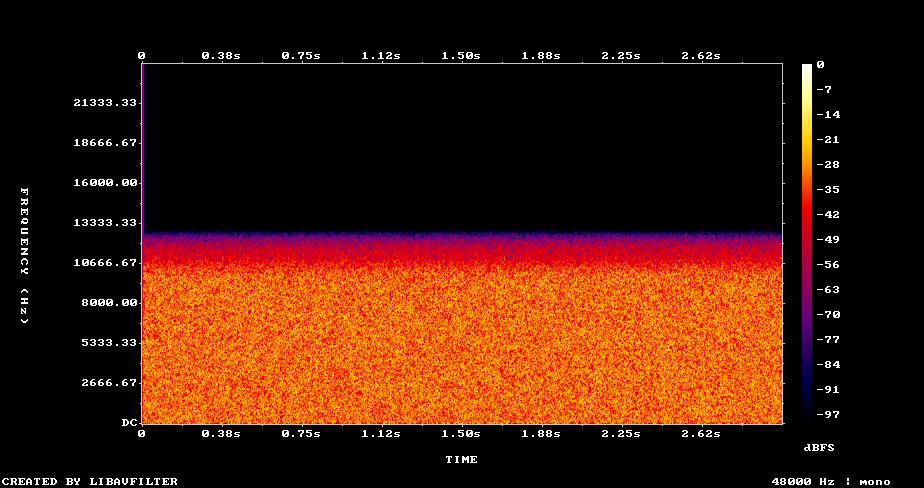
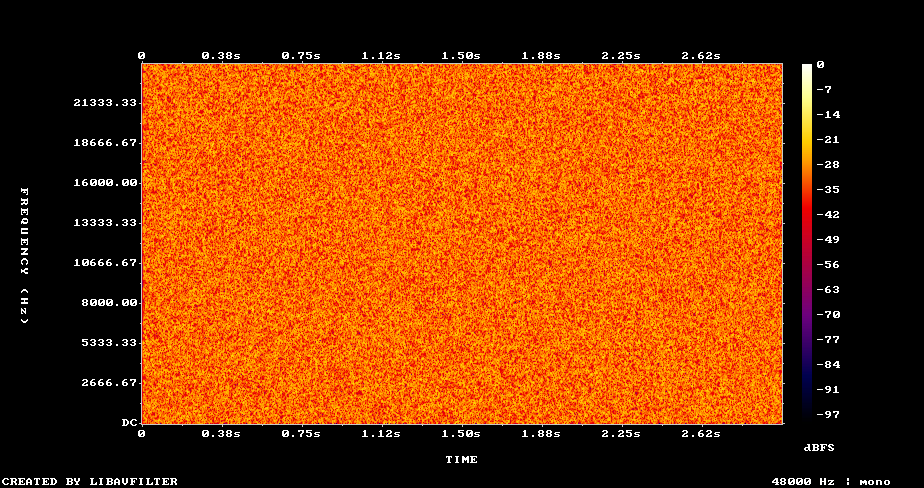
Drag to wipe between them. White noise has equal energy at every frequency, so it lights up the whole chart until something removes it. The right side goes black in a straight line at 11,025 Hz, exactly half of 22,050 Hz, which is the sample rate's Nyquist ceiling and nothing else.
Neither ceiling is a brick wall. A 21 kHz tone came back 4 dB quieter after resampling to 44.1 kHz, even though 21 kHz is technically under its 22.05 kHz limit, because a real anti-aliasing filter rolls off just before the edge instead of cutting instantly. 48 kHz's extra headroom absorbs that roll-off, which is most of its practical case in video work. The exact numbers came from 1970s video gear, not acoustics: engineers recording digital audio onto videotape via a Sony PCM adaptor packed three samples into each usable video line, and 44,100 fell out of the arithmetic for PAL's 294 lines at 50 fields a second. 48 kHz came later, chosen partly because it divides evenly into film's 24 fps.
Should you record or export at 16-bit or 24-bit?
16-bit is enough for anything you'll actually listen to. 24-bit earns its keep while you're still editing. Bit depth works by quantization: each sample gets rounded to the nearest of a fixed number of steps, and every extra bit doubles how many steps you have, worth about 6.02 dB of headroom. We measured it directly with a full-scale test tone, quantized to each depth and compared back to a floating-point reference:
| Bit depth | Measured signal-to-noise | 6.02 × bits + 1.76 dB |
|---|---|---|
| 8-bit | 49.1 dB | 49.9 dB |
| 16-bit | 98.1 dB | 98.1 dB |
| 24-bit | 143.2 dB | 146.2 dB |
The 24-bit row falls a little short of the formula because our own reference signal is 32-bit float, which runs out of precision near -144 dB and starts limiting the measurement rather than the format under test. The noise floor sits a fixed distance below full scale, so it swallows more of whatever's playing as the playing gets quieter.
- 8-bit0.0 dB, noise as loud as the signal
- 16-bit47.9 dB
- 24-bit90.3 dB
Same -50 dBFS test tone, three bit depths. 8-bit has no headroom left at that level at all; 16-bit, the default for almost every file you'll ever open, still has 48 dB of clear air under it.
FileFlip has no bit-depth control anywhere, because there's nothing to set it with. The output format decides. We converted a 24-bit test tone to FLAC and it came back 24-bit, matching FLAC's own spec, which allows up to 32 bits per sample. Convert the same file to MP3 and bit depth stops applying at all: MP3 stores quantized frequency-domain coefficients, not fixed-width PCM numbers, so there's none to preserve or lose.
Does changing the sample rate cost you anything?
Yes, a little, and it doesn't come back. We took a real speech recording, resampled it from 44.1 kHz up to 48 kHz and back down to 44.1 kHz, and compared the result to the original.
| Matches the source exactly | Measured noise vs. source | |
|---|---|---|
| Re-encoded at the same rate (control, no resampling) | Yes, byte for byte | n/a |
| Resampled 44.1 → 48 → 44.1 kHz | No | 67.7 dB signal-to-noise |
The control matters here: without it, you can't tell whether a difference came from the resampling or from something else in the pipeline. Re-encoding at the same rate came back bit-identical, so the pipeline itself adds nothing. The round trip through 48 kHz did not, landing at 67.7 dB, worse than a 16-bit file's own 98 dB noise floor but far cleaner than anything an MP3 encoder does. One resample is inaudible and still not free, and upsampling afterward doesn't undo it: interpolating new points between the samples you have doesn't restore a frequency the earlier resample already removed.
What should you set on FileFlip's Advanced options?
Usually nothing. The Sample rate control under Advanced options offers 22.05, 44.1 and 48 kHz, and its own help text says to "leave this alone unless a device you are targeting needs a specific rate." Changing it only matters when something downstream demands a specific number. The control that actually decides your file's size and quality sits right next to it: see what bitrate controls.
Convert WAV to MP3 and the Bitrate presets, 96 through 320 kbps, change your file far more than sample rate ever does: the same 10-second clip measured 90 KB at 96 kbps and 301 KB at 320 kbps, a 3.3× difference. Switching that same MP3 from 44.1 kHz to 48 kHz at a fixed 192 kbps moved the file by two-tenths of a percent.
What can go wrong if you get this wrong?
Downsampling removes frequencies for good. A 44.1 kHz recording pushed down to 22.05 kHz has thrown away everything above 11 kHz; converting it back up later just produces a bigger file with the same missing top end. Recording or exporting at 8-bit is almost never the right call: our own measurement put its noise floor within 50 dB of full scale, loud enough to bury a quiet passage. And if your source is already an ordinary 16-bit, 44.1 or 48 kHz file, pushing it up to 24-bit or a higher rate first buys nothing; there's no real information at those extra bits to preserve.
Common questions
Does 24-bit audio actually sound better than 16-bit for listening?
Not for anything you'd notice. 16-bit already gives a 98 dB noise floor, well below what most listening environments and playback gear can even show you. 24-bit's real advantage is headroom while editing, tolerating gain changes and quiet passages during mixing without the noise floor turning audible the way 16-bit's can after heavy processing.
Is 48 kHz better than 44.1 kHz for music?
Only right at the top of the audible range, and most listeners won't hear it. Both comfortably clear a typical adult's hearing ceiling. 48 kHz is the more useful default for anything headed to video, since that's the rate video production already standardizes on.
What sample rate should I use for a voice recording or podcast?
44.1 or 48 kHz is a safe, unremarkable choice. Speech carries little above a few kHz, so a lower rate wouldn't hurt intelligibility, but it also wouldn't save enough to be worth the compatibility risk of a nonstandard file.
Why does my video have 48 kHz audio when my music library is 44.1 kHz?
Different histories. 48 kHz became video and broadcast's standard because it lines up cleanly with common film and TV frame rates; 44.1 kHz stuck around from the CD. Neither has a technical reason to convert into the other, which is mostly why FileFlip's Sample rate control exists at all.
Convert between them
- Open WAV to FLAC for a smaller lossless copy, or WAV to MP3 for the smallest file, and drop your file in.
- Leave Sample rate on its default unless a specific device needs one of the other two choices. For MP3, set Bitrate under Advanced options; that's the setting worth thinking about.
- Convert and download. The file is encoded in your browser, nothing is uploaded, there's no account, and it never reaches a server.
For the format details, see the WAV format reference, the FLAC format reference and the MP3 format reference.
How we measured this
- Nyquist table and spectrogram: tones and noise from FFmpeg 8.1.2's
sineandanoisesrcfilters, resampled withffmpeg -ar <rate>, the flagapps/nextjs/src/utils/convert/ffmpeg.tspasses for FileFlip's own Sample rate control. Level measured with theastatsfilter; the spectrogram usedshowspectrumpic, with the 22.05 kHz side upsampled back to 48 kHz afterward only so both charts share one axis. - Quantization table and bars: a 997 Hz sine, full-scale and 50 dB down, generated as 32-bit float PCM in Python (NumPy 2.0.2) rather than FFmpeg's own generator, which quantizes internally to roughly 16-bit precision and would have hidden the effect. Each reference was encoded to
pcm_u8,pcm_s16leandpcm_s24le, decoded back, and compared sample by sample for signal-to-noise. - Bit depth preservation: a 24-bit and 16-bit test tone through
ffmpeg -i in.wav out.flacwith no other flags, the call FileFlip's engine makes, checked withffprobe -show_entries stream=bits_per_raw_sample. Neither MP3 nor FLAC has a WebCodecs encoder in current Chromium, so both take this FFmpeg path rather than the browser's faster one, also noted in what bitrate controls. - Resampling round trip and MP3 size table: the spoken-word WAV used in lossy vs lossless compression, fetched with
pnpm blog:corpora. The control re-encoded with no-arflag; the treatment resampled to 48 kHz and back. Both were checked against the source withffmpeg -f md5. MP3 sizes came fromffmpeg -b:a <rate> -ar <rate>on the same file. - Caveat: this ran on one speech recording plus synthetic tones and noise, not music. A dense mix would show smaller relative resampling loss, its error competing with far more already in the signal, but the shape of every result here does not depend on the source.