Lossy compression throws away data it predicts you won't miss, and that data is gone once it's discarded. Lossless compression only repacks the same data more efficiently, so decoding hands back the exact original, byte for byte. We tested that difference over 20 rounds of editing and re-saving the same photo. Through PNG the pixels came back unchanged. Through JPG at quality 85 they measured 0.9549 SSIM against the original, down from 0.9722 after a single save, and the file grew by about 3%.
Should you use a lossy or a lossless format?
Use lossy compression when:
- The file is finished: you're publishing, streaming or handing it off, not editing it again.
- Size matters more than keeping every bit. Convert PNG to JPG and the file drops to roughly an eighth of its size at quality 85.
- You're distributing audio or video, where the size gap is largest.
Use lossless compression when:
- You'll open, edit and re-save the file again. Lossless survives that indefinitely; lossy degrades further on every pass.
- You're keeping a master or archival copy you might need at full quality later.
- Convert WAV to FLAC shrinks the file to about a fifth of the size, byte-for-byte recoverable.
Lossy vs lossless at a glance
| Lossy | Lossless | |
|---|---|---|
| What encoding does | Discards data predicted to be imperceptible | Re-packs the same data more compactly |
| What decoding returns | An approximation of the original | The exact original, bit for bit |
| Re-saved 20 times, no edits | Size flat, SSIM slips from 0.9722 to 0.9678 | Byte-identical every generation |
| Edited and re-saved 20 times | SSIM falls to 0.9549, file grows about 3% | Pixel-identical, SSIM 1.0000 |
| Size vs an uncompressed source (measured) | JPG q85: 12.6% of the source PNG | FLAC: 19.0% of the source WAV |
| Common formats | JPG, MP3, AAC, H.264 | PNG, FLAC, WAV, ALAC |
Does re-saving a JPG make it worse?
Barely, if you only re-save it. Measurably, if you edit it in between.
We took the 12 Kodak True Color images, encoded each to JPG at quality 85, then decoded and re-encoded at the same quality 20 times with no edit in between. File size held flat, moving less than a tenth of one percent generation to generation, while SSIM against the true original crept down from 0.9722 at the first save to 0.9678 at the twentieth. A plain re-save is nearly, though not perfectly, idempotent, because the DCT coefficients mostly round-trip to the same quantized values.
Real edits happen between saves, though: a crop, a rotation, a levels adjustment. So we ran the loop again with a 1% brightness nudge applied before each re-encode, alternating up and down by the same factor so the image ends each pair back at its original brightness. That small change breaks the 8x8 block alignment the encoder relies on and forces genuine requantization every round.
Then we ran the identical edit sequence through PNG, which gives us a control. Any SSIM the PNG arm loses came from the edits. Anything the JPG arm loses beyond that came from the compression.

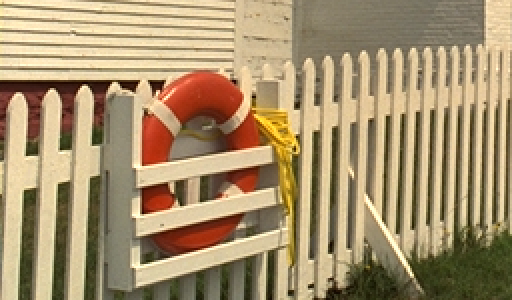
Drag to wipe between them. Both files were opened, nudged and re-saved 20 times. Detail on the ring and in the grass has broken up on the JPG side. Magnified 2x from a 256 by 150 pixel crop of Kodak image 19.
| Generation | JPG SSIM | PNG SSIM | JPG size |
|---|---|---|---|
| 1 | 0.9714 | 0.9997 | 75 KB |
| 5 | 0.9686 | 0.9997 | 76 KB |
| 10 | 0.9639 | 1.0000 | 76 KB |
| 20 | 0.9549 | 1.0000 | 77 KB |
The PNG column is the whole argument. Twenty rounds of opening, editing and saving cost it nothing measurable, while the JPG lost 0.0173 of SSIM and gained about 3% in size, because each requantization pass adds artifacts the next pass then encodes as though they were real detail. That is roughly four times what plain re-saving costs, small per generation, and permanent.
Does re-saving a PNG or a FLAC file make it worse?
No. We took one Kodak image, re-saved it as a PNG 20 times, and hashed the decoded pixel data after every save with magick file.png -depth 8 rgb:- | shasum -a 256. All 21 hashes, the original plus 20 generations, came back identical.
We ran the equivalent test on audio: a 10.76-second spoken-word WAV encoded to FLAC and back to WAV 20 times, comparing the decoded PCM's SHA-256 hash each round. Same result, 21 identical hashes.
The compressed byte size isn't always identical, though the pixels are. That PNG moved from 785,610 bytes to 807,372 bytes after the first re-save, because ImageMagick's DEFLATE settings differ slightly from whatever tool made the original, then held at exactly 807,372 bytes for the remaining 19 saves.
What does lossy compression throw away?
Detail a model predicts you won't perceive, discarded permanently at encoding time. JPEG turns each 8x8 block of pixels into frequency data, then quantizes fine texture more coarsely than broad shape, because vision is far more sensitive to the second. That quantization step, defined in the JPEG standard, ITU-T T.81, is where the data goes, and a lower quality setting sends more of it.
MP3 and AAC do the same for sound, using a psychoacoustic model of which sounds a louder sound nearby is covering. Karlheinz Brandenburg, who co-invented MP3, describes the encoder's job as quantizing spectral components "with the aim of keeping the noise, which is introduced by quantizing, below the masking threshold." Once gone, no decoder can reconstruct it.
What makes lossless compression lossless?
It finds redundancy and encodes it more compactly, deleting nothing. PNG uses DEFLATE, the method behind ZIP, which finds repeated byte sequences and gives common values shorter codes; a screenshot of solid color compresses well, a noisy photograph does not. FLAC uses linear prediction: each sample is estimated from the ones before it and only the difference is stored. Predictor and difference together pin down the original exactly, which is why our 20-generation hash test comes back identical.
How much smaller is a lossy file than a lossless one?
At a matched, reasonable quality setting, dramatically smaller for images and meaningfully smaller for audio.
Across the 12 Kodak images, JPG at quality 85 came out at a median of 12.6% of the source PNG's size, ranging from 10.4% to 18.4%: the PNG was roughly eight times larger for the same picture.
| Format | Median file size | vs raw WAV |
|---|---|---|
| WAV (uncompressed) | 1,898,654 bytes | 100% |
FLAC (flac --best) |
361,022 bytes | 19.0% |
| MP3 (192 kbps) | 260,223 bytes | 13.7% |
Our FLAC result compresses harder than the 30-70% compression range the FLAC project itself publishes for CD-quality audio, because our test clip is spoken word full of quiet pauses, which is more compressible than typical music. Treat 19% as a favorable case, not a universal one.
What happens if you convert a lossy file to a lossless one?
Nothing good. It gets bigger and recovers none of the detail the lossy step already threw away.
We converted a quality-85 JPG to PNG for each of the 12 Kodak images and measured a median size increase of 566%, ranging from 466% to 691%. We converted an MP3 encoded at 192 kbps to FLAC and the file grew from 260,223 bytes to 828,066 bytes, up 218%.
Both outputs are a lossless container wrapped around data that was already lossy. FileFlip converts JPG to PNG and MP3 to FLAC when a destination requires that container, never to improve a file that has already lost detail.
What happens if you convert a lossless file to a lossy one?
A real size reduction, and a one-way door. Once you convert PNG to JPG or WAV to MP3, the pixels or samples the encoder discarded are gone from that copy. Keep an untouched lossless original if there's any chance you'll want full quality again, and only convert the copies you intend to publish or ship.
Common questions
Is WebP lossy or lossless?
Both, depending on how it was encoded. WebP, AVIF and TIFF each support a lossy and a lossless mode in the same container, so the file extension alone doesn't tell you which one you have. See WebP vs JPG for how WebP's lossy mode compares to JPG's.
Does converting MP3 to WAV improve the sound?
No. WAV can hold uncompressed audio, but converting an MP3 to WAV just unpacks the same lossy data into a bigger, uncompressed file. The masking artifacts introduced by the MP3 encoder are already in the samples.
Is FLAC exactly the same quality as WAV?
Yes. FLAC is lossless, so decoding a FLAC file returns the identical PCM samples the WAV held before encoding, which our own hash comparison across 20 generations confirms. The only difference is file size.
How do I make a lossy file smaller without converting it again?
Lower the quality or bitrate on a single encode from the original rather than re-encoding a file that is already compressed. For video that means setting a bitrate rather than changing the container, which is covered in making a video file smaller for email.
Can lossy compression ever be undone?
No. Once an encoder discards data, no decoder can reconstruct it, because it's no longer in the file. Converting to a lossless format afterward just stops further loss from that point on.
Convert between them
FileFlip runs PNG to JPG, JPG to PNG, WAV to FLAC and MP3 to FLAC conversions directly in your browser, on a WebAssembly build of ImageMagick and FFmpeg. The file never leaves your machine, there's no account, and nothing is queued on a server. Open Advanced options to set quality or bitrate on a lossy target before converting.
See the PNG format reference and FLAC format reference for more on each container.
How we measured this
- Image corpus: 12 images from the Kodak True Color test set, each a 768 × 512 uncompressed PNG, encoded with ImageMagick as
magick input.png -quality 85 output.jpg. - JPG generational loop: 20 rounds of decode-and-re-encode at quality 85, one run with no step between rounds and one with a 1% brightness nudge before each re-encode, alternating
-modulate 101,100,100and-modulate 99.0099,100,100so brightness returns to where it started. A one-directional nudge compounds to a 22% shift over 20 rounds, which drags SSIM down by itself and would be miscounted as compression damage. The same edit sequence was run through PNG as a control. SSIM was measured every generation against the untouched source PNG with FFmpeg'sssimfilter, the same method used in our WebP vs JPG measurements. - PNG generational loop: one Kodak image, 20 rounds of
magick prev.png next.png, hashing decoded pixel data each round withmagick file.png -depth 8 rgb:- | shasum -a 256. - Audio source: a 10.76-second, 44.1 kHz stereo WAV of synthesized spoken-word audio (macOS
say, converted with FFmpeg), used instead of a sine tone because speech has real, variable content to compress. - FLAC generational loop: 20 rounds of
flac --bestthenflac -d, comparing the decoded PCM's SHA-256 hash each round. - Compression ratios: median file sizes across the same sources, MP3 encoded at 192 kbps with
ffmpeg -c:a libmp3lame. - Tools: ImageMagick 7.1.2-28 Q16-HDRI, FFmpeg 8.1.2, flac 1.5.0, on macOS.
- Caveat: the FLAC and MP3 ratios come from one speech clip, not a music corpus, and speech compresses harder than typical music. Treat those two figures as a favorable case, not an average.