We measured it rather than repeating the usual figure. Encoding the 12 Kodak test images to both formats with ImageMagick 7.1.2, then matching them by SSIM, put WebP 38% smaller at the median and between 29% and 44% smaller on every image in the set. Google's own published number is 30%. The gap is worth understanding before you convert anything, because it changes what quality setting you should pick.
Which should you use, WebP or JPG?
Choose WebP when:
- The image lives on a website or in an app you control.
- You need transparency. JPG has no alpha channel at all.
- You need animation in a still-image format.
- Page weight matters, which is most of the time. Convert JPG to WebP and you will usually cut the file by a third or more.
Choose JPG when:
- Someone else will open the file and you do not know what they use.
- It goes into a print workflow, or into a system that predates 2022.
- It gets attached to an email, uploaded to an old web form, or handed to a client.
- The image is wider or taller than 16,383 pixels, which is WebP's hard ceiling because the format inherits VP8's 14-bit dimension fields. Convert WebP to JPG for any of these.
WebP vs JPG at a glance
| WEBP | JPG | |
|---|---|---|
| Compression | Lossy or lossless | Lossy only |
| Transparency (alpha channel) | Yes | No |
| Animation | Yes | No |
| Lossless compression | Yes | No |
| Embedded metadata | Yes | Yes |
| Colour profiles | Yes | Yes |
| High dynamic range | No | No |
| Released | 2010 | 1992 |
| Developer | Joint Photographic Experts Group |
Four things that decide the choice in practice, and that a capability table has no row for:
| WebP | JPG | |
|---|---|---|
| Max dimensions | 16,383 × 16,383 px | 65,535 × 65,535 px |
| Colour depth | 8 bits per channel | 8 bits per channel |
| Browser support | Every major browser since Safari 14, September 2020 | Universal |
| Photoshop support | Native since version 23.2, February 2022 | Always |
How much smaller is WebP than JPG?
About 38%, measured on our own encodes rather than taken from anyone's marketing page.
We took the 12 Kodak True Color images, encoded each one to JPG and to WebP across ten quality settings, and measured SSIM against the uncompressed original. Then, for each image, we found the WebP file size that hit exactly the SSIM the JPG achieved. Full method is at the bottom of this page.
| JPG quality setting | WebP size at the same SSIM | Range across the 12 images |
|---|---|---|
| 60 | 38.5% smaller | 26% to 45% |
| 75 | 38.5% smaller | 29% to 44% |
| 85 | 38.7% smaller | 30% to 45% |
| 90 | 38.2% smaller | 32% to 53% |

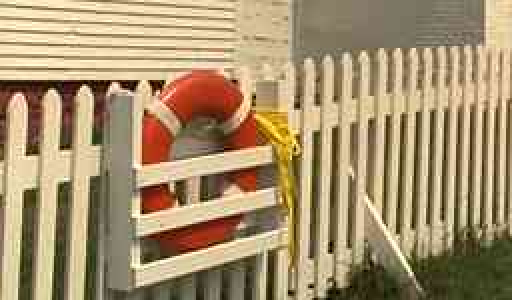
Drag to wipe between them. Quality 30 for the JPG and 42 for the WebP land within 1% of the same file size, so what you see is the codec rather than the setting. SSIM 0.9073 against 0.9305. Magnified 2x from a 256 by 150 pixel crop of Kodak image 19.
The saving barely moves as quality rises, which is the useful part. WebP is not a low-quality trick. It holds roughly the same advantage whether you are encoding a thumbnail or an archival-grade image.
- JPG75 KB
- WebP46 KB, 38% smaller
Measured at the file size each format needs to reach the same SSIM as a JPG at quality 85.
Google's own WebP lossy study puts the figure at around 30%. Ours came out higher for two reasons worth knowing about. ImageMagick writes baseline JPEG through libjpeg-turbo, and a mozjpeg-tuned encoder would close part of the gap. SSIM also tends to reward WebP's smoother decoder output slightly, so treat 38% as the top of the honest range and 30% as the bottom.
Does converting a JPG you already have to WebP make it smaller?
Yes, and by a lot, though you pay a small quality cost that you cannot undo.
Most people are not encoding from a pristine original. They have a JPG and they want a WebP. So we tested that directly: we made a quality-85 JPG from each Kodak image, then re-encoded that JPG to WebP at several settings.
| WebP quality | Size vs the source JPG | SSIM vs the true original |
|---|---|---|
| 70 | 55% smaller | 0.9563 |
| 75 | 52% smaller | 0.9585 |
| 80 | 40% smaller | 0.9635 |
| 85 | 25% smaller | 0.9682 |
| 90 | Same size | 0.9714 |
The source JPG itself scored 0.9722. Read the table with that number in mind and the trade becomes obvious. WebP quality 80 gives you a file 40% smaller and gives back a fraction of a percent of measured quality, which no one will see on a screen. WebP quality 90 is visually identical to your source and saves you nothing, so there is no reason to pick it.
This is a second round of lossy compression on data that was already compressed once. The artifacts baked into your JPG stay baked in. See lossy vs lossless compression for why that damage is permanent.
Does converting WebP to JPG lose quality?
Yes, and unless you push the quality low enough to see the damage, the JPG comes out bigger as well.
We ran the same test in reverse: a quality-80 WebP as the source, converted to JPG at a range of settings.
| JPG quality | Size vs the source WebP | SSIM vs the true original |
|---|---|---|
| 60 | 18% smaller | 0.9317 |
| 75 | 12% bigger | 0.9465 |
| 80 | 29% bigger | 0.9521 |
| 85 | 54% bigger | 0.9581 |
| 90 | 126% bigger | 0.9610 |
| 95 | 220% bigger | 0.9637 |
The source WebP scored 0.9764. No row in that table reaches it, and at quality 95 the JPG is more than three times the size of the WebP it came from while still measuring worse. You can get a smaller JPG by going to quality 60 or below, where the file lands 18% under the source, but SSIM falls to 0.9317 and the artifacts become easy to spot on flat areas.
None of that is a reason to avoid the conversion. It is a reason to run it for compatibility, which is a real need and worth the cost. Converting to JPG in order to save space does not work.
What the quality slider actually does
FileFlip's Quality control under Advanced options maps straight to the encoder's quality value, 1 to 100. Leave it alone and the two formats do not behave the same way, which surprises people.
A JPG you export without touching the slider is written at quality 92. A WebP is written at 75. Those are the encoder defaults, and they are not comparable. Part of the size drop people see when they switch a PNG to WebP is the format, and part of it is a lower default quality setting they never chose.
Here is what each setting produces, as a median across the 12 test images, all encoded from the same uncompressed source:
| Quality | JPG size | JPG SSIM | WebP size | WebP SSIM |
|---|---|---|---|---|
| 50 | 35 KB | 0.9334 | 24 KB | 0.9539 |
| 60 | 40 KB | 0.9419 | 28 KB | 0.9613 |
| 70 | 48 KB | 0.9520 | 32 KB | 0.9666 |
| 75 | 54 KB | 0.9576 | 35 KB | 0.9689 |
| 80 | 62 KB | 0.9646 | 44 KB | 0.9764 |
| 85 | 75 KB | 0.9722 | 57 KB | 0.9826 |
| 90 | 121 KB | 0.9829 | 82 KB | 0.9874 |
| 95 | 181 KB | 0.9892 | 128 KB | 0.9926 |
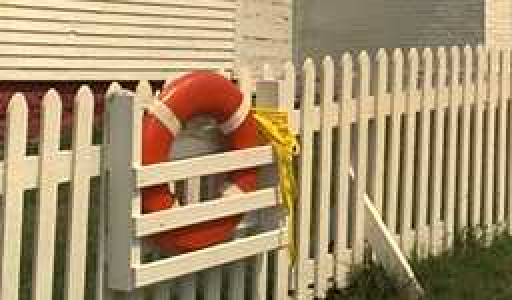 Quality 5040 KB, SSIM 0.9317
 Quality 7057 KB, SSIM 0.9499
 Quality 8588 KB, SSIM 0.9687
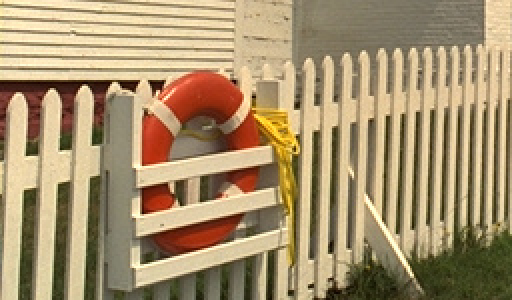 Quality 95196 KB, SSIM 0.9885
Scroll sideways to see all four. The jump from 50 to 70 is obvious on the fence and in the grass; the jump from 85 to 95 costs 108 KB and is hard to see at all. Magnified 2x from a 256 by 150 pixel crop of Kodak image 19.
Quality 80 is the setting we would pick for web images in either format. Below 70 the artifacts start showing on flat areas like skies. Above 90 the file grows much faster than the quality does: JPG doubles in size between 85 and 95 to buy 0.017 of SSIM.
What WebP can do that JPG cannot
Transparency. WebP has an alpha channel in both its lossy and lossless modes. JPG has none. Convert a transparent WebP to JPG and every transparent pixel is filled with solid colour, permanently.
Animation. A WebP file can hold multiple frames. Converting an animated WebP to JPG keeps the first frame and discards the rest.
Lossless mode. WebP can encode without discarding anything, which makes it a PNG replacement as well as a JPG replacement. JPG has no lossless mode, so any conversion into JPG introduces loss even when the source had none.
When JPG is still the right choice
Compatibility is the whole argument, and it is a strong one. Every camera, phone, printer, image viewer and editor made in the last thirty years reads JPG. WebP support arrived late in desktop software: Adobe's own documentation dates full native WebP support in Photoshop to version 23.2, which shipped in 2022.
So if the file is going to a person rather than to a browser, send JPG. The 38% you would save is a few hundred kilobytes, and it buys you a file that some recipient's software may refuse to open.
Common questions
Is WebP better than JPG for SEO?
Only through page speed. Smaller images improve Largest Contentful Paint, and Core Web Vitals feed into ranking. The format itself is not a ranking signal, and swapping formats on a slow page will not fix the page.
Can I open a WebP file on Windows or in Photoshop?
Yes to both, on anything current. Photoshop reads and writes WebP natively from version 23.2 onward, and Windows has handled it since Windows 10. Older installs of either may not, which is when converting to JPG is faster than chasing a plugin.
Why does my phone save HEIC instead of WebP?
Different jobs. WebP is a web delivery format; HEIC is what an iPhone camera writes because it halves storage against JPG at capture time. Neither is a browser-and-camera format, which is why both end up converted. See how to open HEIC files on Windows for the same compatibility problem from the camera side.
Does WebP support transparency?
Yes, in both lossy and lossless mode. This is one of the two things it does that JPG cannot do at all.
Should I convert my whole photo library to WebP?
No. Converting an existing JPG library re-compresses every file a second time for a saving you only benefit from if those images are being served over the web. Convert the copies you publish and leave the originals alone.
Is WebP lossless?
It can be. WebP has both a lossy and a lossless mode, and the format name alone does not tell you which one a given file used. That is decided when the file is encoded.
Convert between them
FileFlip converts WebP to JPG and JPG to WebP inside your browser, on a WebAssembly build of ImageMagick. The file is never uploaded, there is no account, and nothing is queued on a server. Drop the file in, open Advanced options if you want to set quality, and the converted file is ready when the progress bar finishes.
For the format details, see the WebP format reference and the JPG format reference.
How we measured this
- Corpus: 12 images from the Kodak True Color test set (kodim01, 02, 03, 04, 05, 07, 08, 13, 15, 19, 20, 23), each a 768 × 512 uncompressed PNG. This set is the standard corpus in image compression research.
- Encoder: ImageMagick 7.1.2-28 on macOS, invoked as
magick input.png -quality N output.webp. FileFlip runs the same library compiled to WebAssembly, via@imagemagick/magick-wasm0.0.43. - Metric: SSIM computed with FFmpeg's
ssimfilter against the uncompressed source, using the combinedAllvalue across Y, U and V planes. - Matched-quality comparison: for each image we linearly interpolated the WebP size-versus-SSIM curve to find the size at the SSIM the JPG hit at that quality. Figures reported are medians across the 12 images, with the per-image range given alongside.
- Caveat: SSIM is a proxy for human perception, not a substitute for it, and it is mildly generous to WebP. It is used here because Google's own WebP study uses it, which makes the numbers directly comparable.
The script is in the repository at apps/nextjs/scripts/benchmark-image-encoders.mjs. Run it and you should get these numbers back.