Every conversion falls into one of three buckets. PNG to JPG decodes the pixels and re-encodes them, trading some detail for a smaller file. MOV to MP4 usually just moves the same encoded video stream into a new wrapper, unchanged down to the byte. DOCX to Markdown keeps your words and drops whatever Markdown has no character for, like text colour. Here is how to tell which one you are about to get.
Which kind of conversion is my file about to get?
Check what changes between the source and the target, not the file extension.
- Same codec, different box. MP4, MOV and MKV can all hold an H.264 stream unchanged, so moving between them is a copy. Convert MOV to MP4 and FileFlip repackages the stream instead of decoding it.
- Same format family, new settings. A JPG has to be re-encoded from a PNG, at whatever quality you pick. Convert PNG to JPG and you are trading some of the pixels for a smaller file, every time.
- A different kind of file entirely. Cross from a document to a text format, an image to a document, or drop a track, and something gets discarded because the destination has nowhere to put it. Convert DOCX to Markdown and the words survive; the styling does not.
Renaming a file is not a fourth option. It edits the filename and nothing else, which is why file extensions lie about what a file actually contains.
The three kinds of conversion, at a glance
| Kind | What happens to the data | Can you get the original back? | Typical time |
|---|---|---|---|
| Copy | The encoded stream moves into a new wrapper, untouched | Yes, nothing was discarded | Under a second |
| Re-encode | The file is decoded, then compressed again at new settings | No, only what the new settings kept | Seconds to minutes |
| Discard | Whatever the destination has no field for is dropped on the way out | No, and there is no field left to check | Same as a re-encode |
When is a conversion just a copy?
When the codec inside the file already fits the destination container, and FFmpeg only has to move bytes.
We took a 10-second, 1080p Big Buck Bunny clip, remuxed it to MOV, then remuxed that MOV back to MP4, the actual mov>mp4 route. Total time for the second step: 0.12 seconds. The output file came out 21 bytes smaller than the original, out of 30.7 million, and the decoded video stream hashed to the identical MD5 before and after: fdbcce65b679ce6a2139363e44c4166f. Nothing about the picture moved.
- Remux, MOV to MP40.12s, byte-identical stream
- Re-encode to a lower bitrate1.76s, about 15x longer
Both runs on the same clip, on an M-series Mac with multi-core FFmpeg. The gap would look different on a single-threaded WebAssembly build, but a copy stays close to instant and a re-encode does not.
Re-encoding the same clip at a lower bitrate, so it would actually get smaller, took about 15 times longer even across every core on the machine, and the picture measured 91.8 out of 100 on VMAF against the source, a real quality cost a remux never has. For the full story on which pairs remux for free and which ones cannot, see codec vs container, which ran the equivalent test across MP4, MOV and MKV.
A repack works the same way inside a single lossless format. We re-saved one Kodak PNG at ImageMagick's full range of compression-effort settings and every single one came back at SSIM 1.0000, the exact same pixels, while the file size only moved between 613 KB and 637 KB depending on how hard the compressor tried to shrink the packing. Repacking changes how tightly the bytes sit. It does not touch what they mean.
What does re-encoding actually cost you?
Detail, in a way that scales with the quality setting, and it never goes the other way.
We encoded the 12 Kodak True Color images straight from their uncompressed PNGs to JPG across the usual quality range and measured SSIM against the source.
| JPG quality | Median size | Median SSIM |
|---|---|---|
| 30 | 24 KB | 0.9082 |
| 50 | 35 KB | 0.9334 |
| 70 | 48 KB | 0.9520 |
| 85 | 75 KB | 0.9722 |
| 95 | 181 KB | 0.9892 |
Quality 85 is a reasonable default: 75 KB from an original that ran several times larger, at an SSIM most people cannot tell apart from the source on a screen. Below quality 60, the loss starts showing on flat areas like skies. None of it is recoverable afterward, and encoding the same JPG a second time compounds it: our lossy vs lossless compression piece put 20 rounds of edit-and-resave at SSIM 0.9549, down from 0.9722 after the first save, using the same corpus and a brightness-controlled experiment so the drop could not be blamed on anything but the codec.
What does a conversion throw away?
Whatever the destination format has no field for, which is a longer list than most people expect.
Transparency. JPG has no alpha channel at all, so any pixel a PNG left partly or fully transparent gets filled with a solid colour on the way out. We converted a PNG badge with a translucent ring to JPG with the same ImageMagick build FileFlip runs, and every transparent pixel came back rgb(0,0,0), solid black, because there is no fourth channel in JPG to hold the gap.
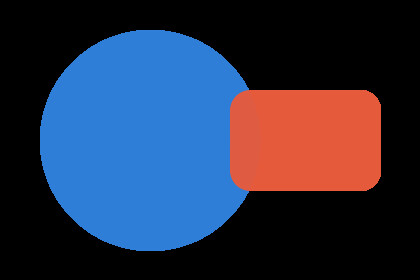

Same badge, same ImageMagick build FileFlip uses. Only the alpha channel changed: JPG has nowhere to store it, so every transparent and semi-transparent pixel became solid black.
Layers. A layered file like PSD collapses into one flat image the moment it exports to PNG or JPG, because neither format has a layer panel to keep the pieces apart. Once flattened, there is no un-flattening it.
Metadata. We built a DOCX with a title and author set, converted it to Markdown, and both survived as YAML front matter, because FileFlip's Pandoc call asks for a standalone document. What did not survive: the file's own word count, paragraph count, page count and the "Microsoft Word" application tag that Word writes into every document's docProps/app.xml. None of it appears anywhere in the Markdown, because Markdown has no place to put it.
Styling. Bold, italic, headings, tables, hyperlinks and footnotes all made the trip from our test DOCX to Markdown intact. A run of red text on a yellow highlight, set as direct character formatting rather than a paragraph style, did not: the highlight survived as a bare, colourless marker and the red was dropped completely, because Markdown has no syntax for a font colour.
Text encoding. None of the above touches whether the letters themselves survive. That's a separate failure mode covered in text encodings, and where the é went: the bytes can carry every character correctly and still render as garbage if the wrong encoding gets assumed on the way out.
What does each of these three conversions actually drop?
| Pair | What survives | What is gone |
|---|---|---|
| PNG → JPG | Pixels, EXIF metadata, ICC colour profile | Transparency, and any frames after the first |
| MOV → MP4 | The video and audio streams, untouched, when the codec already fits MP4 | Nothing in that case; a codec MP4 cannot hold forces a real re-encode instead |
| DOCX → MD | Headings, bold and italic, tables, hyperlinks, footnotes, embedded images, title and author | Font colour and highlighting, page layout, and Word's own document statistics |
How do you know which one you are about to get, before you convert?
FileFlip does not show you a preview of what a conversion will discard before you run it, so the format pair is the only warning you get.
Staying inside one format family with a compatible codec is close to free, and the MOV to MP4 numbers above are the general case for that. Changing the codec or the quality setting inside a family always re-encodes, and every re-encode below the source's own quality throws something away. Crossing between media families, image to document, video to audio, document to image, always discards something by definition, because the destination format was never built to hold what the source has.
The one thing worth doing before any of these: keep the original file. A repack is free to re-run and a remux is close to it, but a re-encode or a discard only happens once, and there is no way to ask for the missing part back afterward.
Common questions
Does converting PNG to JPG always lose quality?
Yes to the pixels once you are below the highest quality setting, and yes to transparency at any quality, because JPG has no alpha channel to keep it in. Above quality 90 the pixel loss is real but usually invisible on a normal screen.
Does changing a video's container ever lose quality?
No, as long as the codec inside already fits the destination container, which is what our MOV to MP4 test measured: a byte-identical stream in a new wrapper. It only costs you something when the codec does not fit and FileFlip has to decode and re-encode to make the file play, a different operation behind the same button.
Why does my Word document lose its formatting when I convert it to Markdown?
Because Markdown has no character for it. Structure like headings, bold text, tables and hyperlinks all have a direct Markdown equivalent and survive the trip. Font colour, highlighting beyond a generic marker, and page layout do not, because there is nothing in Markdown's syntax that means "make this red."
Is renaming a file the same as converting it?
No. Renaming changes characters in the filename; converting decodes the actual bytes and writes new ones. See why file extensions lie for what happens when the two get confused with each other.
Convert between them
FileFlip converts PNG to JPG, MOV to MP4 and DOCX to Markdown in your browser, on WebAssembly builds of ImageMagick, FFmpeg and Pandoc. The file never leaves your machine, there is no account, and nothing is queued on a server. Open Advanced options before a lossy conversion if you want to set the quality yourself.
How we measured this
- Image corpus: 12 images from the Kodak True Color test set, each a 768 × 512 uncompressed PNG, encoded with ImageMagick 7.1.2-28 as
magick input.png -quality N output.jpg, SSIM measured against the source with FFmpeg 8.1.2'sssimfilter. Reproduces withpnpm blog:bench-image <corpus> jpg png. - PNG repack test: one Kodak image, re-saved as
magick input.png -quality N output.pngat every setting from 30 to 95, SSIM measured the same way. - Video source: a 10-second, 1080p clip of Big Buck Bunny (Blender Foundation, CC BY 3.0), 30.7 MB, H.264. Remuxed with
ffmpeg -i source.mp4 -c copy out.mov, thenffmpeg -i out.mov -c copy out.mp4, timed with/usr/bin/time -p, median of three runs. The decoded stream was hashed withffmpeg -i file -c copy -f md5 -. Re-encoded withffmpeg -i source.mp4 -c:v libx264 -b:v 5M out.mp4, scored against the source with FFmpeg'slibvmaffilter. - Transparency test: a synthetic PNG badge with a translucent ring and rectangle, converted with
magick badge.png -quality 90 badge.jpg, pixel values read back withmagick badge.jpg -format "%[pixel:p{x,y}]" info:. - Document test: a DOCX built with Pandoc 3.10.2 from a Markdown source carrying a title, author, heading, bold and italic text, a table, a hyperlink, a footnote, an embedded image, and one run of raw OOXML setting a font colour and highlight. Converted back with
pandoc report.docx -s -o report.md, the same--standaloneflag FileFlip's Pandoc call uses, confirmed in the worker source. Pandoc 3.10.2 matches the 3.10 buildpandoc-wasmembeds. - Caveat: the document test used a file Pandoc itself wrote, not one that came out of years of edits in real Word, so it shows the formatting Pandoc's own DOCX writer produces rather than the full range a hand-edited document can accumulate. A real-world file is more likely to lose more than this, not less. The video timings ran on multi-core desktop FFmpeg; FileFlip's WebAssembly build will be slower in absolute seconds, though the gap between a copy and a re-encode holds regardless of how many cores are doing the work.