We encoded a photo to JPEG twice: once at quality 90, a careful export, then again at quality 75, a typical default for wherever it gets uploaded next. SSIM against the source fell from 0.9821 after one pass to 0.9646 after two. Three more passes at that same quality 75 moved it by less than 0.001 total. The damage came from the quality dropping once, not from the number of times the file was saved.
Should you re-save the file you have, or go back to the original?
Go back to the original whenever you still have it. Re-save the copy only when you must.
- You have the uncompressed original and need a JPG or an MP3. Convert PNG to JPG or convert FLAC to MP3 once, at the quality you actually want, and stop.
- You only have an already-compressed copy and need a smaller one. Re-encoding it is your only option, and it will cost you something. How much depends on whether the quality drops and whether you've edited it, both covered below.
- You're passing a lossy file through several apps or platforms before it lands somewhere. Each one that re-compresses it, even at "the same" settings, is another pass. Assume it isn't free unless you've checked.
Generation loss at a glance
| Format | Lossy or lossless | Safe to re-save without loss | What actually compounds it |
|---|---|---|---|
| JPG | Lossy | Only at the identical quality, with no edit | Any drop in quality, or any edit, between saves |
| MP3 | Lossy | No, not even at an unchanged bitrate | Every pass, whether or not the file size moves |
| PNG | Lossless | Yes, always | Nothing. Decoding returns the exact pixels |
| FLAC | Lossless | Yes, always | Nothing. Decoding returns the exact samples |
Does converting a JPG to JPG lose quality?
Yes, whenever the second encode uses a different quality setting than the first, which is most conversions you don't fully control.
We took the 12 Kodak True Color images, encoded each to JPEG at quality 90, then re-encoded that file at quality 75 four times in a row with no edits anywhere in the chain.
| Generation | Quality used | Median SSIM vs. the true original | Median file size |
|---|---|---|---|
| 1 | 90 | 0.9829 | 121 KB |
| 2 | 75 | 0.9671 | 63 KB |
| 3 | 75 | 0.9671 | 63 KB |
| 4 | 75 | 0.9671 | 63 KB |
| 5 | 75 | 0.9670 | 63 KB |

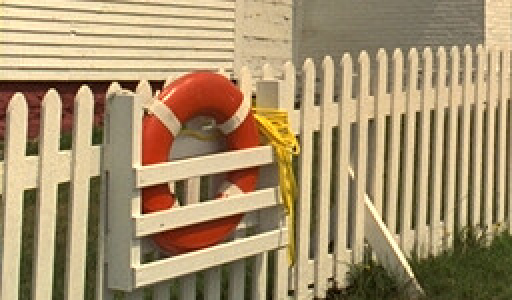
Drag to wipe between them. The right image is the left one decoded and re-encoded a second time at quality 75. SSIM against the original drops from 0.9821 to 0.9646 and the fence rails and grass lose definition. Magnified 2x from a 256 by 150 pixel crop of Kodak image 19.
Nearly the entire drop happens at the second generation, the one step where the quality setting actually changed. Generations 3 through 5 barely move, because they repeat the exact same quality on a file that's already there. That's the pattern behind "two round trips through JPEG are visibly worse than one": it isn't the count of saves that hurts you, it's a quality setting going down at any point in the chain.
None of this touches the other choice a JPEG encoder makes, whether the file is laid out as baseline or progressive. That's a question of the order the same bytes arrive in, not how many of them there are; see progressive vs baseline JPEG for what it actually changes.
Can you fix a low-quality JPG by saving it at a higher quality?
No. Raising the quality setting on the second pass makes the file bigger without giving back what the first pass threw away.
A JPEG encoder quantizes each 8x8 block of pixels, rounding the fine detail into a smaller set of possible values, which the JPEG standard, ITU-T T.81, defines as a many-to-one mapping. A quality 50 pass rounds hard, and once it does, the exact values it rounded away aren't stored anywhere in that file. Re-encoding at quality 95 asks the second pass to round more gently, but it's rounding the same coarse approximation the first pass already produced. There's no way for it to know what the original fine detail was.
We measured it directly on the same 12 images: a quality 50 encode, then that file re-encoded at quality 95, compared against encoding the untouched original straight to quality 95.
| Median SSIM vs. the true original | Median file size | |
|---|---|---|
| Quality 50 (the damaged source) | 0.9334 | 35 KB |
| Quality 50 re-saved at quality 95 | 0.9344 | 59 KB |
| Original encoded straight to quality 95 | 0.9892 | 181 KB |

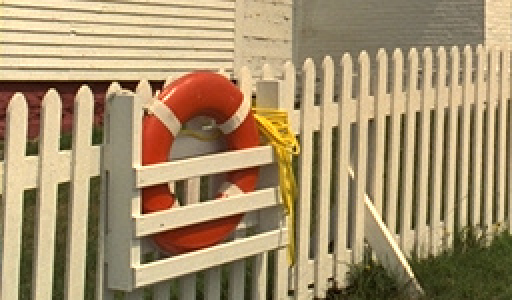
Both files are quality 95 JPGs. The left one was encoded from the untouched original. The right one started from a quality 50 copy of the same image, and raising the setting on the second pass cannot recover what the first pass already discarded: SSIM 0.9885 against 0.9324. Magnified 2x from a 256 by 150 pixel crop of Kodak image 19.
- Quality 50 source41 KB
- Quality 50, re-saved at 9569 KB, SSIM 0.9317 to 0.9324
- Original straight to quality 95196 KB, SSIM 0.9885
File size for Kodak image 19 at each step. Re-saving the damaged copy at quality 95 spends more than half the bytes of a fresh quality 95 encode and buys back almost none of the quality.
Which formats are safe to save over and over?
PNG and FLAC, without exception. JPG and MP3, only under conditions most people don't check.
We re-saved one Kodak image as a PNG five times in a row and hashed the decoded pixels after every save: all five matched the original exactly. We ran the same test on FLAC, encoding and decoding our speech WAV five times, and every decode's hash matched the source PCM. Neither format has a quality setting to get wrong, because decoding either one returns the exact bytes that went in.
MP3 is the format that catches people off guard. We re-encoded the same file at 192 kbps five times in a row with no edits, and the file size held flat at 180,602 bytes from the first generation on. But not one of those five decodes matched the original audio, and no generation matched the one before it either. A JPEG re-saved at an unchanged quality can settle into something close to a fixed point, as the table above shows. An MP3 does not: the file size stopping is not a sign that the audio stopped changing.
Why should you always convert from the original file?
Because the "fix" experiment above shows what happens when you don't: the second pass can't undo what the first one threw away, so a copy of a copy is a ceiling you can't push back past.
Say you have both the original PNG and a JPG made from it at quality 90, and you now need a JPG small enough for an upload limit. Re-encoding that quality 90 JPG down to quality 75 caps out around 0.967 SSIM, per the table above. Converting the PNG to JPG at quality 75 directly starts from the full-detail source and has no earlier loss to compound. Keep an uncompressed or lossless master when one exists, and treat any lossy file you're handed as the only version of the file you have.
Is there a case where re-encoding costs nothing?
Close to it, for JPEG specifically: the exact same quality setting, no edits, on a file that hasn't changed.
We re-encoded the same JPEG at quality 85, five times in a row, with nothing touched in between.
| Generation | Median SSIM vs. the true original |
|---|---|
| 1 | 0.9722 |
| 2 | 0.9718 |
| 3 | 0.9715 |
| 4 | 0.9713 |
| 5 | 0.9711 |
Five generations at an unchanged quality cost 0.0011 of SSIM, about a sixth of what a single quality drop from 90 to 75 costs. That's the one case where converting it again is nearly free: nothing about the file or the settings changed, so the encoder mostly reproduces the quantized values it produced last time. Change the quality, crop it, adjust the color, or switch encoders, and you're back to paying the full cost. It doesn't extend to MP3, where even unchanged settings never reproduce the same bits twice.
Common questions
Does converting a JPG to PNG and back lose quality?
No further loss, but no recovery either. See lossy vs lossless compression: a quality 85 JPG converted to PNG grew by a median of 566% and kept the exact same artifacts, because PNG can only losslessly store whatever it's handed.
Why does a shared image look worse every time it's reposted?
Because most platforms re-compress whatever you upload at their own quality setting, not yours. Each repost is another pass at a setting you don't control, the same mechanism as the quality 90-then-75 chain above.
Does converting MP3 to MP3 lose quality?
Yes. FileFlip has no MP3-to-MP3 route, but the question matters if you're re-exporting audio elsewhere: our test re-encoded the same MP3 at 192 kbps five times, and no decode matched the original or the generation before it.
Is FLAC really lossless no matter how many times you re-save it?
Yes. All five of our FLAC re-saves decoded back to a PCM hash identical to the source, because FLAC's compression is reversible by design and there's no quality setting to slip.
Convert between them
FileFlip converts PNG to JPG and FLAC to MP3 directly in your browser, on WebAssembly builds of ImageMagick and FFmpeg. The file never leaves your machine, there's no account, and nothing is queued on a server. Open Advanced options before converting to set the quality or bitrate yourself, rather than accepting whatever a default gives you.
See the PNG format reference, JPG format reference, FLAC format reference, and MP3 format reference for more on each.
How we measured this
- Image corpus: 12 images from the Kodak True Color test set, each a 768 x 512 uncompressed PNG.
- Audio source: one 7.47-second, 44.1 kHz stereo speech WAV, 1,316,926 bytes uncompressed.
- Quality 90 then 75 chain: each image encoded once at quality 90, then decoded and re-encoded at quality 75 four times in a row with
magick input.png -quality N output.jpg, no edits at any step. SSIM measured every generation against the untouched source with FFmpeg'sssimfilter, combined Y/U/V. - Quality 85 chain: the same method, quality 85 held constant across five generations, as the same-settings control.
- Fix experiment: each image encoded once at quality 50, that file re-encoded at quality 95, and compared against encoding the untouched original straight to quality 95.
- PNG hash test: one Kodak image, five rounds of
magick prev.png next.png, decoded pixels hashed each round withffmpeg -i file.png -f md5 -. - FLAC hash test: the speech WAV, five rounds of
flac --bestthenflac -d, decoded PCM hashed the same way. - MP3 test: the speech WAV encoded to MP3 at 192 kbps with
ffmpeg -c:a libmp3lame -b:a 192k, then re-encoded from its own output at the same bitrate four more times, hashing decoded PCM each round. - Tools: ImageMagick 7.1.2-28 Q16-HDRI, FFmpeg 8.1.2, flac 1.5.0, on macOS.
- Caveat: the audio results come from one speech clip, not a music corpus, and the image chain uses one illustrative quality sequence rather than every sequence a real upload pipeline might use. Treat the specific numbers as one measured case, and the pattern, that a quality drop compounds and an unchanged pass mostly doesn't, as the transferable part.
The script is in the repository at apps/nextjs/scripts/benchmark-generation-loss.mjs. Run it against the corpus above and you should get these numbers back.