We quantized the 12 Kodak True Color photographs to a 256-colour palette and compared the result against the same images stored truecolour. The indexed files came out 65.3% smaller at the median, and measurably worse: SSIM against the original fell to a median of 0.9770, down as far as 0.9131 on the busiest image in the set. That trade is the entire story of indexed colour, and it runs the other way for flat art, which is where the choice actually gets interesting.
Should you use truecolour or indexed colour?
Use indexed colour (GIF, or a PNG written as PNG8) when:
- The image is a screenshot, icon, logo, or anything built from flat fills rather than a camera. Ours ran 155 real colours down to 37 with no visible loss.
- File size matters more than a palette ceiling you'll never hit anyway.
- The file needs to open in software from before 2000, where GIF is the only image format guaranteed to work.
Use truecolour (a plain PNG, or any photographic format) when:
- The source is a photograph, a render, or has a gradient, a sky, or skin tones in it. Convert GIF to PNG for a photographic GIF you want stored properly.
- You'll edit the file again. A palette is a one-way trip; you can index a truecolour file later, never the reverse.
- You need soft-edged transparency. Convert PNG to GIF only if a single, fully-opaque-or-not alpha channel is fine.
Indexed colour vs truecolour at a glance
| Truecolour (plain PNG) | Indexed (GIF, or PNG8) | |
|---|---|---|
| Colours per image | Up to 16.8 million | 256, hard ceiling |
| What's stored per pixel | Three 8-bit channels | One palette index |
| Transparency | Full alpha, 256 levels | Binary: on or off, nothing between |
| Suits | Photographs, gradients, renders | Flat fills, screenshots, line art |
| Can you raise the cap | Not applicable, no cap exists | No, not in either format |
How much smaller is an indexed PNG than a truecolour one?
About two-thirds smaller on a photograph, and it costs you real quality to get there.
We wrote each Kodak image out twice with ImageMagick: once as a forced truecolour PNG, once quantized to 256 colours with dithering off, so the only variable is the palette. The indexed version won on size every time and lost on SSIM every time.
| Image | Truecolour | Indexed, 256 colours | Smaller by | SSIM |
|---|---|---|---|---|
| kodim02 (smallest saving) | 618,673 B | 284,513 B | 54.0% | 0.9879 |
| kodim19 | 671,486 B | 237,236 B | 64.7% | 0.9771 |
| kodim23 (largest saving) | 559,186 B | 152,198 B | 72.8% | 0.9131 |
| Median across 12 | 65.3% | 0.9770 |
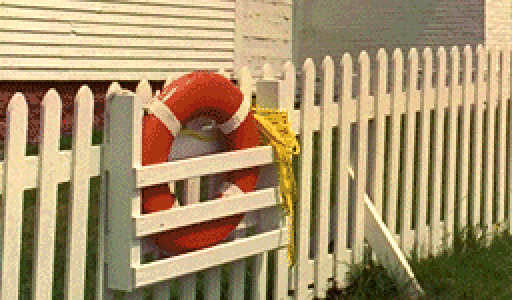
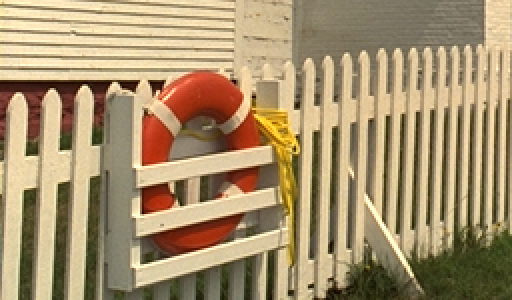
Only the palette changed. The sky, the widest flat area in the frame, is where a limited palette shows up first. Magnified 2x from a 256 by 150 pixel crop of Kodak image 19.
Worth noticing: the image that saved the most, kodim23, also lost the most SSIM. A bigger saving from quantization means the source had more distinct colour to throw away in the first place, so the two numbers move together rather than one being the reward for the other.
Where does GIF's 256-colour cap bite?
Everywhere, because GIF has no truecolour mode to fall back on. Every GIF, from a 1990s icon to a photo someone saved as one by mistake, is quantized to 256 colours, and there is no quality setting that changes that.
We isolated what the cap costs beyond the colour loss itself: we quantized each Kodak image to the same 256-colour palette once, then wrote that identical pixel data out as both a GIF and a PNG8. SSIM between the two came back 1.0000, exactly, on every image, because they hold the same pixels. The GIF file was bigger anyway, 16.8% bigger at the median, ranging from 8.6% to 20.1% across the set.
- PNG8232 KB
- GIF260 KB, 16.8% bigger
Kodak image 19, quantized once to 256 colours and written to both formats from the same pixel data. The gap is pure container overhead: GIF's LZW compression against PNG's DEFLATE.
That gap is GIF's own compression method, LZW, dating to the format's 1987 origin, losing to DEFLATE, which is roughly a decade newer and what every PNG uses underneath. The colour cap and the compression method are two separate costs, and GIF pays both.
Does dithering fix banding, and what does it cost?
It hides the banding almost for free, and the file usually gets smaller, not bigger.
We took the same 256-colour quantization and ran it twice more, once with Floyd-Steinberg error diffusion and once without. Dithering came out smaller in 10 of the 12 images, 9.3% smaller at the median. It wasn't universal: kodim03 came out 5.2% bigger and kodim23, the same image that lost the most quality above, came out 30.2% bigger.
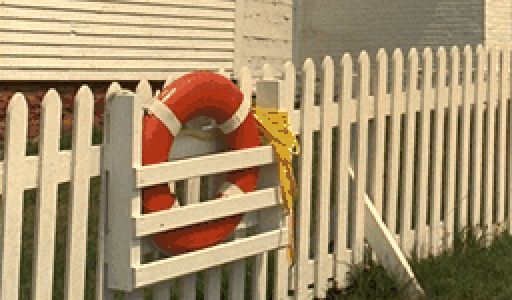
Same 256 colours on both sides. Without dithering the sky settles into flat bands; with it, error diffusion scatters the rounding error pixel by pixel, which is the grain you're actually seeing when a compressed PNG looks noisy. Magnified 2x from a 256 by 150 pixel crop of Kodak image 19.
Here's the number that needs a caveat: SSIM against the source dropped from a median of 0.9770 without dithering to 0.8417 with it, which reads like dithering makes the image worse. It doesn't, not to a person looking at it.
SSIM compares pixels in small local windows, and dithering's whole job is to make neighbouring pixels differ on purpose so your eye averages them into a colour neither one actually is, exactly the pattern SSIM is built to penalize. Bit depth and banding measures the same effect on a per-channel gradient rather than a whole palette, closer to what a viewer experiences than SSIM's pixel-by-pixel score.
What decides whether your PNG comes out truecolour or indexed?
Whatever the source already was, not anything you pick.
We built a flat-colour test graphic, a banner, a circle, two blocks of solid colour and some text, 155 distinct colours once you count the anti-aliased edges. Converting it to a plain PNG kept it truecolour, 5,839 bytes, because that's what it started as. Writing it explicitly as an indexed PNG got it down to 37 colours and 1,889 bytes, a 67.7% saving, at an SSIM of 0.999979 against the source, which is as close to free as a saving gets.


Full frame, no crop or magnification: at this colour count there's nothing for a crop to reveal. Held constant: the source graphic and the encoder. Only the storage type changed.
The PNG specification treats truecolour and indexed as separate colour types the writer chooses, and FileFlip's plain PNG target keeps whichever one the source already used. A GIF converts to PNG and stays indexed: the identical test on a GIF version of a Kodak photograph came back at 237,217 bytes, a rounding error from writing it as PNG8 directly. A truecolour PNG stays truecolour even when, like our graphic, it would fit in a palette a fraction of the size.
So if you want the smaller file from flat art and your source didn't start out indexed, converting it to GIF and back to PNG gets you there. Converting it straight to PNG does not, because nothing on that route ever asks whether the file could be smaller.
What you lose by saving something as indexed colour
Gradients band, dithering or not. Even with error diffusion smoothing the transition, a sky built from 256 colours has fewer real steps than one built from 16.8 million. The figures above show how much is left.
Transparency drops to on-or-off. Both GIF and PNG8 support only binary transparency: a pixel is fully see-through or it isn't. A drop shadow or an anti-aliased edge saved through either turns jagged. Alpha channels and transparency covers the cost in more detail.
The cap doesn't move. No quality setting, no "high" mode, no flag gets GIF or PNG8 past 256 colours. If the source needs more, the fix is not using an indexed format.
Common questions
Why does my PNG look grainy?
Something in its path quantized it to a limited palette and turned dithering on to hide the resulting bands, probably a save-for-web step or an image optimizer rather than anything you did. The grain is the dithering pattern; the file got smaller because of the 256-colour cap underneath it, worth roughly 65% at the median in our own test, not because of the dithering itself.
Does GIF ever support more than 256 colours?
No. It's a limit built into the format's 1987 design, not a setting anyone can raise, in any variant, at any quality.
Is PNG8 the same thing as GIF?
Close, not identical. Both cap out at 256 colours and one palette index per pixel. PNG8 compresses that with DEFLATE, 16.8% ahead of GIF's LZW in our own test, and has no animation. GIF's one advantage is holding multiple frames; PNG8 can't.
Can I raise the quality when converting to GIF?
No, deliberately. Advanced options offers a Quality slider for lossy targets like JPG or WebP, but GIF doesn't get one: there's no fidelity dial, the encoder picks the palette and the dithering on its own.
Should I convert an old GIF to PNG?
Yes, if you don't need the animation. Our test found the conversion keeps the identical palette almost byte-for-byte, gaining DEFLATE's smaller size and a format any current tool reopens, for free.
Convert between them
FileFlip converts GIF to PNG and PNG to GIF directly in your browser, on a WebAssembly build of ImageMagick. The file never leaves your machine, there's no account, and nothing is queued on a server.
See the GIF format reference and PNG format reference for what else each container can hold.
How we measured this
- Corpus: 12 images from the Kodak True Color test set, each a 768 x 512 uncompressed PNG.
- Truecolour vs indexed: each source written with
magick source.png PNG24:out.pngandmagick source.png +dither -colors 256 PNG8:out.png, isolating the palette as the only variable. - Dithering: the same 256-colour quantization repeated with
-dither FloydSteinbergin place of+dither. - GIF vs PNG8: the same
+dither -colors 256quantization written to bothGIF:andPNG8:, so both containers hold identical pixel data. - Flat graphic: a synthetic 480 x 300 image built with ImageMagick's
-draw, three flat fills and one line of anti-aliased text, standing in for icon and UI-style art generally. - Metric: SSIM computed with FFmpeg's
ssimfilter against each unquantized source, the combinedAllvalue across Y, U and V planes, the same method used across our other measured posts. - Tools: ImageMagick 7.1.2-28 Q16-HDRI and FFmpeg 8.1.2, on macOS.
- Caveat: SSIM scores dithering harshly because it compares pixels in small local windows, and dithering deliberately varies neighbouring pixels so the eye averages them; treat the 0.8417 median for dithered images as a measure of pixel-level deviation, not of how the image actually looks.
The script is in the repository at apps/nextjs/scripts/measure-indexed-color.mjs. Run it against the Kodak corpus and you should get these numbers back.