Every CR2 and DNG file stores one colour value per pixel, arranged in a repeating grid behind red, green and blue filters. A demosaicing algorithm interpolates the other two colours at every pixel from its neighbours, and that interpolated guess is the photo you get back. We measured it: FileFlip's default demosaic came out 63% brighter than one camera's own JPEG rendering, and 37% darker than another's.
What should you check before converting a RAW file?
Whether you need the file to match what the camera showed you, or just need it in a format something else can open.
- You're turning CR2 or DNG into something shareable. Convert CR2 to JPG or convert DNG to PNG and FileFlip demosaics it in your browser. Expect the exposure and colour to land close to the camera's own screen preview, not identical to it; the measured gap is below.
- The result looks flatter or off-colour than you expected. That's the normal behaviour of a converter with no white balance or maker's tone curve applied, not a broken file. See what those two things do, further down.
- You want the file back as CR2 or DNG afterward. FileFlip reads both but writes neither, and no browser-based tool reverses a demosaic anyway: the original per-pixel sensor readout is gone the moment the file leaves the RAW stage.
RAW formats at a glance
| Format | What it stores | FileFlip reads it | FileFlip writes it | First released |
|---|---|---|---|---|
| CR2 | Bayer sensor data, lossless-JPEG compressed (Canon) | Yes | No | 2004 |
| DNG | Bayer sensor data, Adobe's published spec | Yes | No | 2004 |
| JPG | Demosaiced, white-balanced, lossy-compressed pixels | Yes | Yes | 1992 |
Full capability breakdowns are on the CR2, DNG and JPG format pages. DNG is now ISO 12234-4, a published, royalty-free specification; CR2 is Canon's own, undocumented outside Canon's SDK licence.
What is the Bayer grid on a camera sensor?
A grid of colour filters, one over each photosite, so every pixel position records only one of red, green or blue rather than all three.
Bryce Bayer patented the arrangement at Eastman Kodak in 1976, describing a sensor where "luminance- and chrominance-sensitive elements... occur in a repeated pattern with luminance elements dominating the array". In practice that means a 2x2 tile repeated across the whole sensor: two green filters, one red, one blue, doubled up on green because human vision resolves green detail more finely than red or blue. Both files we tested for this piece use that arrangement, confirmed with dcraw -i -v, which reports it as RG/GB.
The sensor itself has no idea what colour anything is. A photosite under a green filter just counts photons that got past that filter and reports a number. Turning a grid of single numbers into a picture is the whole job of what comes next.
How does demosaicing interpolate the missing colour channels?
By looking at each pixel's neighbours and guessing the two colours that pixel's own filter didn't record.
A pixel that sat under a red filter has a real red value and needs a green and a blue value borrowed from nearby green- and blue-filtered pixels. The simplest version of this is bilinear interpolation: average the surrounding pixels of the missing colour. Better algorithms, the kind desktop RAW processors run, also look at edges so they don't blur a sharp line by averaging across it. ImageMagick, the engine FileFlip runs, uses its own built-in demosaic with no edge-aware step, which is faster and simpler than what a dedicated RAW processor does, and it shows in fine detail.
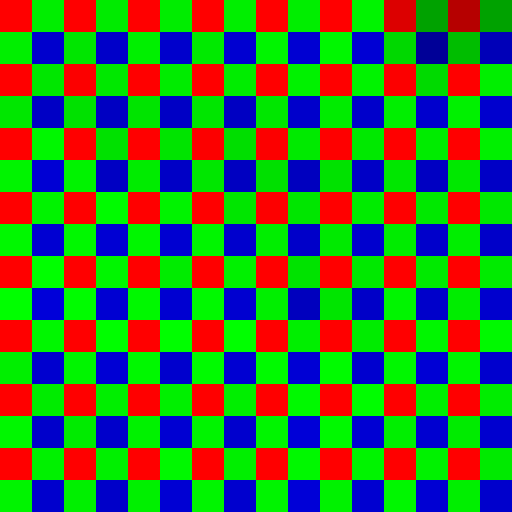 What the sensor recordedOne channel per photosite, coloured by its own filter
 After FileFlip's demosaicEvery pixel now carries all three channels
A 16×16 patch of bright bark from a real Canon CR2 (EOS-1D Mark II), magnified 32× with a point filter so each square is one photosite. The left frame is the sensor's own raw reading, decoded with dcraw's document mode and coloured by each photosite's actual filter, red, green or blue, with the other two channels left at zero. The right frame is the same patch after FileFlip's ImageMagick demosaic fills in what each photosite didn't record.
That grid of solid red, green and blue squares is not a picture of anything, it's the literal sensor data. The pale, continuous result on the right is what interpolation reconstructs from it, borrowing values across neighbouring photosites until every pixel has all three channels.
What do white balance and the maker's colour curves do to a RAW file?
They take the demosaiced numbers and adjust them to match what the light in the scene, and the manufacturer's taste, would produce.
A demosaiced sensor reading is not automatically the right colour. Photosites respond differently under tungsten light than under daylight, so white balance rescales the red and blue channels to make something the scene photographed as neutral look neutral again. On top of that, every camera maker bakes in a tone and colour response, Canon's Picture Style, Nikon's Picture Control, Fujifilm's film simulations, that raises contrast, nudges skin tones, and rolls off highlights in a way meant to look good straight off the sensor. None of that is stored as pixel data. It's a rendering choice the maker's own software, or a converter that has decoded that maker's colour profile, applies afterward. A demosaic with no white balance step and no maker curve just isn't the same image, even reading the exact same sensor values.
Why do two RAW converters disagree on the same file?
Because "correct" white balance and tone rendering are choices, not something stored in the file, so a converter that skips them produces a different photo from one that supplies its own.
We tested this directly. A camera's own JPEG, embedded in the RAW file at capture time, is that camera's answer to those choices. FileFlip's default conversion is ImageMagick's answer: demosaic the sensor data and hand it back, no white balance, no maker curve. We compared the two on the same files, measuring mean brightness and standard deviation with ImageMagick's own fx:mean and fx:standard_deviation on the full-resolution image.
| RAW file | Camera's embedded JPEG | FileFlip's default demosaic | Brightness | Contrast (stddev) |
|---|---|---|---|---|
| CR2, Canon EOS-1D Mark II | Mean luma 44.3 | Mean luma 72.3 | 63% brighter | 6% higher |
| DNG, Canon EOS 350D | Mean luma 61.3 | Mean luma 38.5 | 37% darker | 25% lower |
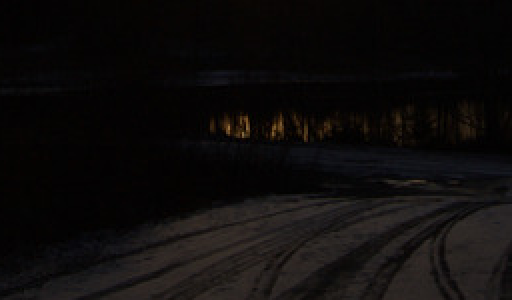
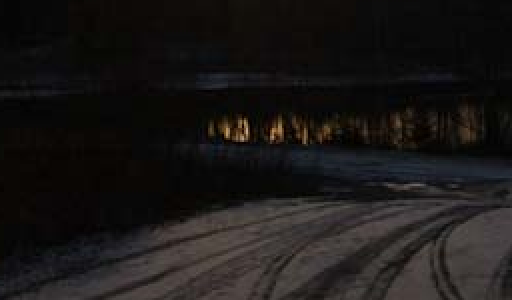
Same DNG file, Canon EOS 350D, same framing. FileFlip's plain demosaic measures 37% darker than the camera's own embedded preview, because nothing in the pipeline applies the camera's tone curve. Cropped to the same 256×150 region and scaled to 512×300: the preview magnified 2× with a point filter, the higher-resolution decode downsampled with a Lanczos filter so both land at the same size.
The two files didn't move in the same direction. The CR2 came out brighter than its camera JPEG, the DNG came out darker and noticeably flatter, 25% less contrast. That's the honest caveat: there's no single correction to mentally apply. A default demosaic can land on either side of the camera's own rendering, depending on how far that particular scene's picture style pushed the tone curve.
What does FileFlip's RAW path actually do?
Reads the file with ImageMagick, demosaics it with ImageMagick's built-in defaults, and writes it straight to the target format in one step, all inside your browser.
FileFlip's own CR2 to JPG converter page states this plainly: "camera raw is demosaiced with ImageMagick's defaults, which will not match the camera's own rendering." That's the same ImageMagick build, compiled to WebAssembly, that produced every number in the table above, so the measurements reflect exactly what running a conversion does. CR2 and DNG are both marked readable but not writable in FileFlip's own format registry, which is why there's no route back: you can convert a CR2 to JPG, never a JPG to CR2. Why RAW files can be opened but never created covers why no converter, not just FileFlip's, can write one.
Worth knowing before you convert one:
- Some cameras write RAW files that are already lossily compressed, so the source isn't always a full, untouched sensor record.
- A high-resolution file can be too much for this decoder. An 8-megapixel CR2 from 2004 converted without issue in our testing; a 50-megapixel CR2 from a Canon EOS 5DS failed to decode at all, with no output produced. If a RAW file won't convert, that's worth knowing before you assume the file itself is corrupt.
Common questions
Is a RAW file lossless?
Usually, but not guaranteed. CR2 compresses the sensor readout with lossless JPEG, so nothing is discarded. Some cameras and some DNG settings use lossy RAW compression instead, which is why FileFlip's own conversion notes call this out rather than promising it for every file.
Can I get a RAW file back after converting it to JPG?
No. Demosaicing throws away the fact that each pixel only ever had one real channel; a JPG has no way to recover which value at each pixel was measured and which was interpolated. Keep the original CR2 or DNG if you might need to reprocess the shot.
Should I convert CR2 to DNG instead of JPG?
Only if you want an open, documented archive format instead of Canon's proprietary one. DNG keeps the same sensor data and the same demosaic problem; it doesn't fix the flat or off-colour look, because that's a rendering step, not a format difference. What a conversion actually costs you covers the same "what actually moves and what doesn't" question for other format pairs.
Does a phone's RAW or ProRAW file work the same way?
Yes, same Bayer grid, same demosaic step, usually with more processing already baked in by the phone's own camera app before you ever see the file. The colour-management side of that pipeline, what happens once a colour space is assigned, is covered separately in colour profiles, and why your photo changed colour.
Convert your RAW files
FileFlip converts CR2 to JPG and DNG to PNG entirely in your browser, on a WebAssembly build of ImageMagick. Nothing uploads, there's no account, and the demosaic runs exactly as measured above, tone curve and all. The image converter hub lists every other format FileFlip reads and writes.
How we measured this
- Files: a CR2 from a Canon EOS-1D Mark II (
raw.pixls.us, 2004 camera, 8 MP) and a DNG carrying a Canon EOS 350D's sensor data (DNG spec version 1.2.0.0,rawsamples.ch). - Reference "camera" rendering: each file's own embedded preview JPEG, extracted with
exiftool -b -PreviewImage, the same JPEG a camera or computer would show as a thumbnail without running a RAW processor. - FileFlip's conversion: run through
@imagemagick/magick-wasm0.0.43'sImageMagick.readandimage.write, the identical callssrc/workers/image.worker.tsmakes, loaded with the samemagick.wasmbinary FileFlip serves to the browser (14,828,458 bytes, byte-identical to the package's own build), not the nativemagickCLI, which resolves CR2 and DNG through a different, delegate-based code path on this machine and isn't representative of what ships. - Brightness and contrast:
magick file.jpg -colorspace Gray -format "%[fx:mean*255] %[fx:standard_deviation*255]" info:on each full, unresized image. - Bayer mosaic figure:
dcraw -d -T -o 0on the CR2 to get the undemosaiced, single-channel-per-pixel sensor grid, cropped to 16x16 pixels, then coloured per photosite by the RG/GB patterndcraw -i -vreports for that file, using ImageMagick channel masks. The "after" frame is the same 16x16 region cropped from FileFlip's own demosaiced output. - Large-file check: the same
ImageMagick.readcall against a 50-megapixel CR2 (Canon EOS 5DS,rawsamples.ch), which threw before producing any output, while every other tested file, including a 24-megapixel Sony ARW and a 12-megapixel Nikon NEF, decoded without issue. - Caveat: an embedded preview is the camera's rendering choice, not a ground truth for "correct" colour, and it can carry its own sharpening or noise reduction beyond white balance and tone curve. It's a fair stand-in for "what you'd have seen without a RAW processor," which is exactly the comparison this piece is making.
Reproduce it with magick, dcraw and exiftool from the commands above; there's no dedicated script for this one yet.